Introduction
Capesoft MailSync allows you to import mail, newsgroups and folders from
Microsoft Outlook Express (which has been renamed to Window Mail with
the release of Windows Vista). In addition to support for Outlook Express,
MailSync also supports importing contacts from Microsoft Outlook, although
for a fully featured solution to access mail, contacts, tasks, appointments
and more from Outlook we recommend
Capesoft
Office Inside. MailSync ships as source code and Clarion templates,
there are no DLLs or black boxes.
MailSync will import email and newsgroup
messages from Outlook 2000 and Outlook Express 5 and 6 (and Contact
address book details from Outlook) - it comes complete with all
source code and procedures needed to manage messages from within
your application.
Upgrading From ExpressFlash To MailSync
Important: When upgrading you will need to change the class name in the local procedure template.
See the
FAQ question 1 for details.
Main Features
- MailSync opens up lots of new possibilities
for Clarion developers - such as being able to process orders
emailed automatically from a website.
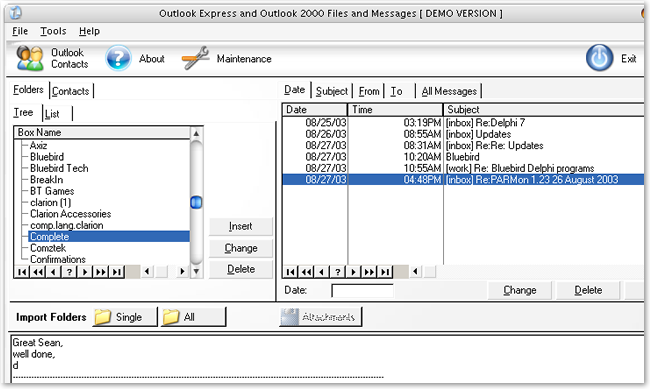
- Ready-made browse control for managing
your mail boxes (see below)
- Automatic location of your Outlook 2000
and Outlook Express messages folder
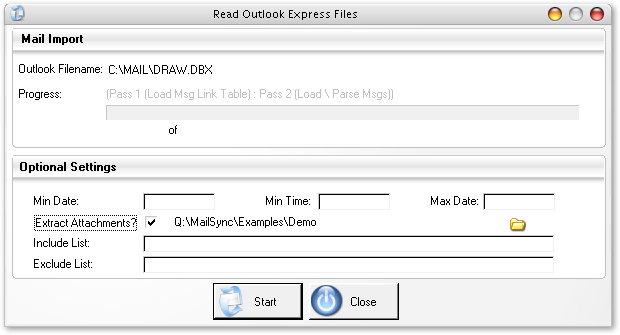
- You can specify a starting date & time
for each import run so you don't get any overlap between batches
of emails converted.(see screenshot below) And if you don't
want to use attachments (such as ZIP files and images) you can exclude these.
- Links in automatically to your "people
files" (such as Employees and Customers) using the email address.
- Import from Outlook contact address books
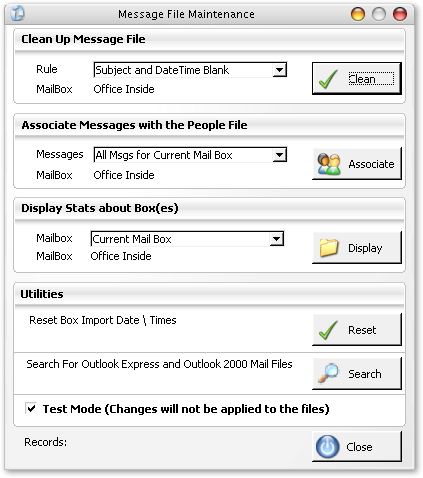
- Maintenance options (see below) for cleaning
up the message file according to various
rules. The handy Test Only option lets
you see how many messages would be affected
by a particular rule.
- And for developers who like to dive in
and work at the source code level there is an
option to convert Outlook Express mailboxes
to "raw" text data - which you
can then parse out as you want.
- Compatible with C5.5 ABC, Outlook 2000
(via OLE) and Outlook Express 5 & 6
(via DBX files)
- Sample APP and DCT supplied
- All source code supplied. No black boxes. No runtime royalties.
Maintenance Options Window (below)
Copyright & Licensing
This program is protected by copyright law and international treaties.
This software is copyright. This means
that you should only use this software
if you have paid for it. One license is required for each developer
that uses MailSync . Because we understand that as a developer
you might use more that one computer (for example a home computer,
work computer and a laptop) we allow MailSync to be installed on
multiple systems. However if you have more
than one developer working on an application that uses
MailSync then you need a license for each developer. If you need more than
one license, then discounts are available, contact

for more information.
License Agreement
CapeSoft Software, employees
of CapeSoft Software and Dealers of CapeSoft Software
products explicitly accept no liability for any loss or
damages which may occur from using this package. This package is
used entirely at your own risk.
Use of this package constitutes agreement
with this license.
Please contact
should you have any queries.
Distribution and Royalties
MailSync is
royalty free, you may use
it in as many applications as you like without paying any royalties
for each copy that you produce.
You may not distribute any of the
files that ship with MailSync (including
but not limited to the source code and template). Because MailSync ships
as source code, it compiles into your application and you do not
need to ship any additional files
in order to use MailSync in your applications.
Upgrade Policy
CapeSoft products have always had a free upgrade
policy. i.e. You pay for the product once and then all the
new upgrades and features are free. At the moment this is
policy for MailSync. It could change in
future, but this has been the case for the past 10 years.
PAD File:
http://www.capesoft.com/utilities/com_pad.xml
Installation
- The installation program will have registered the template
(MailSync.tpl).
- Open your dictionary and use File/import to bring in
MailSync.txd from your Clarion\3rdparty\libsrc directory.
- With your app open, click on Global/Extensions and Insert
'MailSync (Application) - there are no prompts
for this template.
- Import procedures using File/Import Text bring in MailSync.txa
Clarion\3rdparty\libsrc directory,
which contains the following 12 procedures (see the list below).
- An alternative process
Instead importing the TXA file as above you could also use File/Import From
Application to bring in the above procedures one by one from SyncDemo.app file.
Detailed information on the template prompts for each main procedure is contained
in the topic Template Prompts
Please note that the Demo APP is just what it says - it shows
you what can be done with the templates, it is not a production application.
It has a lot of bells and whistles that make the demo run a little slow at times
because all features are being used at the same time. But you might
not need all these features.
Also - the Load Contacts "browse" is just a quick "see it
works" list box. MailSync reads all the Contact data into
the queue t_EF_OutlookContactsQ - more info is in the
Templates,
Importing Messages and
Importing
Contacts topics.
Procedures Imported from MailSync.txa
- Brw:Boxfile (Main Control Browse Window)
- Win:Maintenance (Various Maintenance Functions)
- Win:ImportOutlookExpress (Procedure to Read OutlookExpress Files)
- Win:ImportOutlookContacts ( Procedure to Read OutlookContacts)
- Frm:BoxFile (Folders Form)
- Frm:MsgFile (Message Form)
- Frm:MsgFile_To
- Frm:MsgFile_From
- Frm:Peofile:To
- Frm:Peofile:From
- Src:ReadDirectory (Read Directory Searching for Files).
- Src:FindPerson (Find person by email address).
Outlook 2000 and Accessing Contacts
To access Outlook 2000 messages you will need CDO Collaboration
Data Objects 1.2 (CDO) installed. Click
here
for details on how to Acquire & Install CDO.
For full integration with Microsoft Office and Outlook we recommend
Capesoft
Office Inside which allows you to import and export Contacts,
Messages, Appointments and Tasks, as well as integrating with
Word, Excel and PowerPoint.
Acquiring and Installing CDO
You can acquire CDO in one of several ways, for example:
- Windows 95/98/NT Workstation: Download Outlook 98.
- Windows NT Server: Download Exchange 5.5.
When you install Outlook 98, you should have cdo.dll, cdohtml.dll,
and mapi32.dll installed onto your system.
When you install Exchange 5.5, you must take special steps in
order to install these libraries. Choose Custom Setup. From this
setup, select IIS/Active Server/Active Server Pages Option. This setup
process causes the earlier DLLs to be installed on your system.
You may for some reason get stuck manually installing the CDO library.
You can easily do this with the following statement
regsvr32 cdo.dll.
Type this command from a DOS prompt. The regsvr32 is a
utility that invokes self-registration routines embedded within
an in-process COM object such as cdo.dll.
CDO 1.21 was previously available for download in a redistributable
format. However, the redistributable version of CDO
is no longer available. CDO must be installed by another
product, such as Microsoft Outlook or Microsoft Exchange.
Outlook 2000 installation does not include CDO component
by default, CDO component has to be chosen during the installation.
Extract Attachments
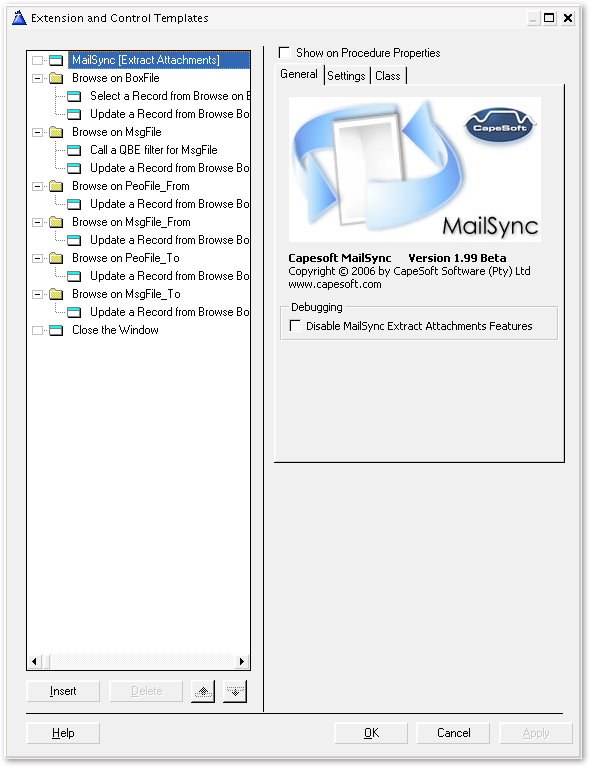
Attachments to messages could be anything from ZIPs to image files
and can get very big. To speed up the import process the end user
has the option to skip attachments.
They can also skip particular types of attachment such as EXEs
- file types should be separated by semicolons as shown below
The trace file is a text file which contains the "raw" message information.
This file gives the option to parse out the message components
(from, to, subject etc.) yourself for specialist purposes
Please Note : the Demo APP is just what it says -- it shows you
what can be done with the templates, it is not a production application.
It has a lot of bells and whistles that make the demo run a little
slow at times because all features are being used at the same time.
But you might not need all these features.
Regarding the Load Contacts "browse" in the demo - it
is just a quick "see it works" list box.
MailSync reads all the Contact data into the queue t_EF_OutlookContactsQ
- from where you can process it as you want. ( Please refer to
Microsoft online documentation for meaning of these fields)The
structure of this Queue is:
t_EF_OutlookContactsQ  QUEUE,TYPE

Account                        CSTRING(61)

Anniversary                    CSTRING(61)

AssistantName                  CSTRING(61)

AssistantTelephoneNumber       CSTRING(61)

BillingInformation             CSTRING(61)

Birthday                       CSTRING(61)

Body                           CSTRING(61)

Business2TelephoneNumber       CSTRING(61)

BusinessAddress                CSTRING(61)

BusinessAddressCity            CSTRING(61)

BusinessAddressCountry         CSTRING(61)

BusinessAddressPostOfficeBox   CSTRING(61)

BusinessAddressPostalCode      CSTRING(61)

BusinessAddressState           CSTRING(61)

BusinessAddressStreet          CSTRING(61)

BusinessFaxNumber              CSTRING(61)

BusinessHomePage               CSTRING(61)

BusinessTelephoneNumber        CSTRING(61)

CallbackTelephoneNumber        CSTRING(61)

CarTelephoneNumber             CSTRING(61)

Categories                     CSTRING(61)

Children                       CSTRING(61)

Companies                      CSTRING(61)

CompanyAndFullName             CSTRING(61)

CompanyLastFirstNoSpace        CSTRING(61)

CompanyLastFirstSpaceOnly      CSTRING(61)

CompanyMainTelephoneNumber     CSTRING(61)

CompanyName                    CSTRING(61)

ComputerNetworkName            CSTRING(61)

ConversationTopic              CSTRING(61)

CreationTime                   CSTRING(61)

CustomerID                     CSTRING(61)

Department                     CSTRING(61)

Email1Address                  CSTRING(61)

Email1DisplayName              CSTRING(61)

Email2Address                  CSTRING(61)

Email2DisplayName              CSTRING(61)

Email3Address                  CSTRING(61)

Email3DisplayName              CSTRING(61)

EntryID                        CSTRING(61)          ! This is the Unique ID

FTPSite                        CSTRING(61)

FileAs                         CSTRING(61)

FirstName                      CSTRING(61)

FullName                       CSTRING(61)

FullNameAndCompany             CSTRING(61)

Gender                         CSTRING(61)

GovernmentIDNumber             CSTRING(61)

Hobby                          CSTRING(61)

Home2TelephoneNumber           CSTRING(61)

HomeAddress                    CSTRING(61)

HomeAddressCity                CSTRING(61)

HomeAddressCountry             CSTRING(61)

HomeAddressPostOfficeBox       CSTRING(61)

HomeAddressPostalCode          CSTRING(61)

HomeAddressState               CSTRING(61)

HomeAddressStreet              CSTRING(61)

HomeFaxNumber                  CSTRING(61)

HomeTelephoneNumber            CSTRING(61)

IMAddress                      CSTRING(61)

ISDNNumber                     CSTRING(61)

Initials                       CSTRING(61)

InternetFreeBusyAddress        CSTRING(61)

IsConflict                     CSTRING(61)

JobTitle                       CSTRING(61)

Language                       CSTRING(61)

LastFirstAndSuffix             CSTRING(61)

LastFirstNoSpace               CSTRING(61)

LastFirstNoSpaceAndSuffix      CSTRING(61)

LastFirstNoSpaceCompany        CSTRING(61)

LastFirstSpaceOnly             CSTRING(61)

LastFirstSpaceOnlyCompany      CSTRING(61)

LastModificationTime           CSTRING(61)

LastName                       CSTRING(61)

LastNameAndFirstName           CSTRING(61)

MailingAddress                 CSTRING(61)

MailingAddressCity             CSTRING(61)

MailingAddressCountry          CSTRING(61)

MailingAddressPostOfficeBox    CSTRING(61)

MailingAddressPostalCode       CSTRING(61)

MailingAddressState            CSTRING(61)

MailingAddressStreet           CSTRING(61)

ManagerName                    CSTRING(61)

MiddleName                     CSTRING(61)

Mileage                        CSTRING(61)

MobileTelephoneNumber          CSTRING(61)

NetMeetingAlias                CSTRING(61)

NetMeetingServer               CSTRING(61)

NickName                       CSTRING(61)

OfficeLocation                 CSTRING(61)

OrganizationalIDNumber         CSTRING(61)

OtherAddress                   CSTRING(61)

OtherAddressCity               CSTRING(61)

OtherAddressCountry            CSTRING(61)

OtherAddressPostOfficeBox      CSTRING(61)

OtherAddressPostalCode         CSTRING(61)

OtherAddressState              CSTRING(61)

OtherAddressStreet             CSTRING(61)

OtherFaxNumber                 CSTRING(61)

OtherTelephoneNumber           CSTRING(61)

PagerNumber                    CSTRING(61)

PersonalHomePage               CSTRING(61)

PrimaryTelephoneNumber         CSTRING(61)

Profession                     CSTRING(61)

RadioTelephoneNumber           CSTRING(61)

ReferredBy                     CSTRING(61)

Spouse                         CSTRING(61)

Subject                        CSTRING(61)

Suffix                         CSTRING(61)

TTYTDDTelephoneNumber          CSTRING(61)

TelexNumber                    CSTRING(61)

Title                          CSTRING(61)

User1                          CSTRING(61)

User2                          CSTRING(61)

User3                          CSTRING(61)

User4                          CSTRING(61)

UserCertificate                CSTRING(61)

WebPage                        CSTRING(61)

YomiCompanyName                CSTRING(61)

YomiFirstName                  CSTRING(61)

YomiLastName                   CSTRING(61)

END
FAQs
- I am upgrading from ExpressFlash to MailSync, what do I need to do?
- Install MailSync (you can uninstall ExpressFlash
first if so desired to ensure no old files are left on your system).
- In each procedure that used the ExpressFlash template, go
to the Extension for the procedure and select the MailSync Template.
- Change the Object name to ExpressFlash instead of MailSync.
(i.e MailSyncExport becomes ExpressFlashExport).
- Why are some folders marked as inactive during import?
These files will be found in your Outlook Express folder
OFFLINE.DBX
FOLDERS.DBX
POP3UIDL.DBX
They should be marked inactive -- they are not valid Mailbox files, they
are control files.
- I get a message saying I need CDO to be installed - how do I do this?
Collaboration Data Objects 1.2 (CDO) - these are not installed
automatically with Outlook 2000 - its an option under the install
accessories menu on the Outlook/Microsoft Office CD.
For more information see CDO Topic
- I imported a newsgroup with 50 messages but only
3 showed up in MsgFile.tps
Make sure before you run the MailSync import procedure
that all the messages you want have been downloaded using
Outlook Express.
The message might show in the OE browser but it could be just the header
not the full message.
You can do this in OE (with a newsgroup highlighted) using Tools/Synchronize
Newsgroup
Purchase and Support
| CapeSoft Support |
| Email |
 |
| Telephone |
+27 21 715 4000 |
| Fax |
+27 21 715 2535 |
| Post |
PO Box 511, Plumstead, 7801, Cape Town, South Africa
|
CapeSoft MailSync may be purchased from:
| CapeSoft Sales |
| Web |
www.capesoft.com |
| Email |
 |
| Telephone |
+27 21 715 4000 |
| Fax |
+27 21 715 2535 |
| Post |
PO Box 511, Plumstead, 7801, Cape Town, South Africa |
License and Copyright
This program is protected by copyright law and international treaties.
Copyright and Licensing
This software is copyright. This means that you should only use this software if you have paid for it.
One license is required for each developer that uses MailSync. Because we understand that as a developer
you might use more that one computer (for example a home computer, work computer and a laptop) we allow MailSync
to be installed on multiple systems. However if you have more than one developer working on an application that
uses MailSync then you need a license for each developer. If you need more than one license, then discounts are available,
contact for more information.
License Agreement
CapeSoft Software, employees of CapeSoft Software and Dealers of CapeSoft Software products explicitly accept no
liability for any loss or damages which may occur from using this package. This package is used entirely at your own risk.
Use of this package constitutes agreement with this license.
Please contact should you have any queries.
Distribution and Royalties
MailSync is royalty free, you may use it in as many applications as you like without paying any royalties for each copy that you produce.
You may not distribute any of the files that ship with MailSync (including but not limited to the source code and template). Because MailSync
ships as source code, it compiles into your application and you do not need to ship any additional files in order to use MailSync in your applications.
Version History
MailSync 2.02
- Clarion 7 compatible install.
MailSync 2.01
- Fixed documentation errors.
- Fixed incorrect naming in documentation and typographic errors.
MailSync 2.00
- Important: When upgrading you will need to change the class
name in each local template see the FAQ question 1
for details.
- First release of CapeSoft MailSync. Previously this product
was called ExpressFlash, the last version of which will be 1.99.
- Update example application.
- All new documentation.
- New templates, which maintain backward compatibility with ExpressFlash.
- Classes etc. renamed from Expressflash to MailSync.