|
Version 3.7.0 - 21
April 2011
- Update the Auto-upgrade functionality.
- Update of all internal libraries.
Version 3.6.2 Beta (14 October 2010)
- Fixed
- Registration problems when registering a new installer of Mailer
that had not had a previously loaded license (registration via drag
and drop of the XML registration file worked correctly, but not
manual entry of the details).
Version 3.6.1 Beta (30 September 2009)
- Fixed
- Mail Default. The From Name field was still disabled by default,
and hence skipped when tabbing.
- The CHM documentation (Help) file was not correctly updated for
builds and the version history was out of date
- The Help shortcut in the Start menu pointed to the HTML file and
not the CHM Help file.
- Added
- Vista, Windows 7 and Windows Server 2008 compatibility.
- New data storage in the Microsoft specified data directories
- New installer system allows installation for all users (shared),
the current user only, or for data share on a network (LAN)
- New automatic intelligent data migration system
- Updated the HTML editor, streamlined the toolbar and removed
extraneous options.
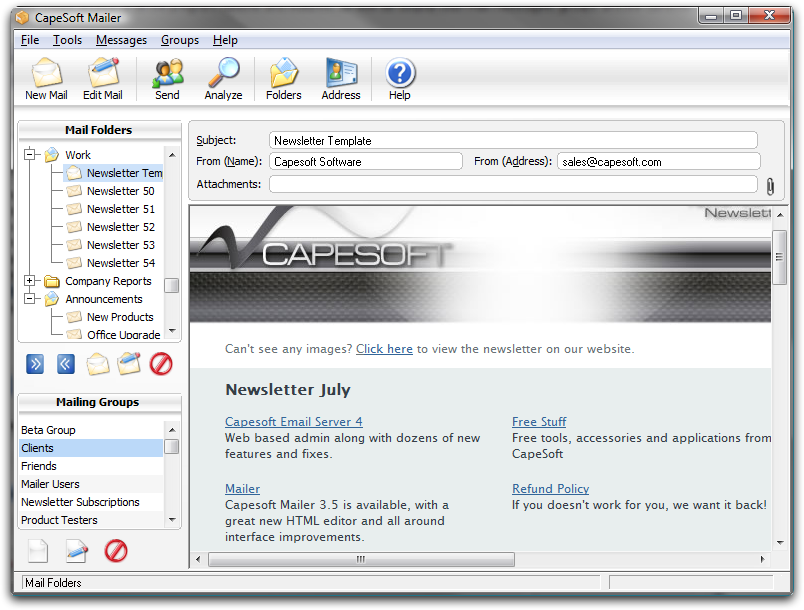
- Improved the preview display and the information displayed by
the information bar.
Version 3.5.5 (16 September 2009)
- Fixed
- Embedding of images for display in Microsoft Outlook.
- Embedding of images where a number of images where used one
after the other with long files names (the last name was not being
correctly embedded).
- Added
- Support for additional mail formats and encoding/decode
- Small updates to the docs and FAQ
- Improved compatibility of mail with Microsoft Outlook
Version 3.5.4 (7 September 2009)
- Fixed
- When filling in the mail defaults filling in the default from
address and then tabbing to the next field select the From Name,
rather than skipping it. The same applies to the Reply To address
and name.
- Fixed the "Text Only/Html and Text" button on the editor window
moving incorrectly when the window was resized.
- Blurred Cleartype when editing mailing groups entries in the
listbox.
- The Tickboxes in the Mailing Group window not working correctly.
- Spelling mistake on the Settings window ("Category")
- Changed/Improved
- When saving the Text log after performing a send, the '.txt'
extension is now automatically added if it not extension has been
specified.
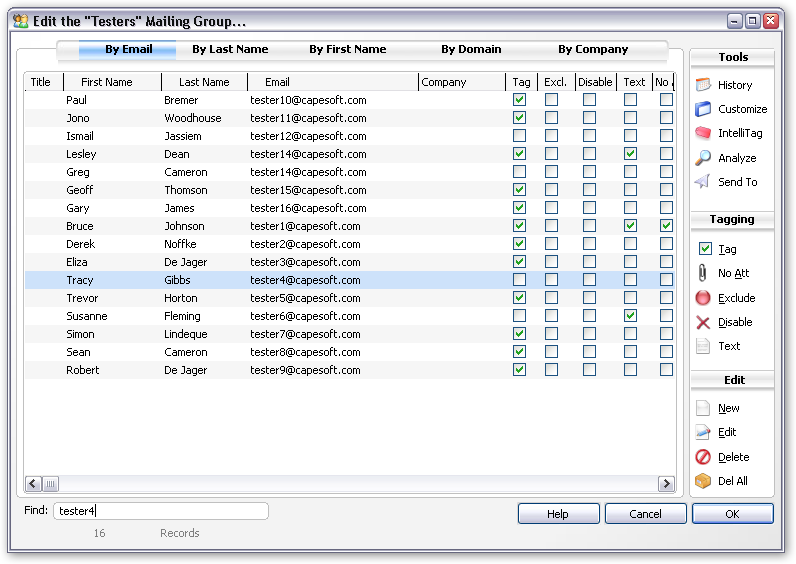
- In the Mailing Group list the checkboxes for Tagged, Excluded
etc. can now be enabled or disabled by single clicking on them,
without having to edit the record.
- Improved compatibility with Outlook for embedded images.
Version 3.5.2 (14 July 2009)
- New/Added
- Text Only option to the editor, which allows messages to be
switched between Text Only and Text/HTML mode. Switching to Text
Only will ignore the HTML part of the email, but no delete it (if it
has already been created).
- If a mail is set to Text Only in the editor it will display as
text in the preview and will be sent as Text Only, with no HTML part
(even if an HTML part has previously been created).
- If the HTML editor is left empty and the option to
automatically update the text part of the email from the HTML is
enabled, the application now does not overwrite the text (the HTML
is only auto converted to update the text part if it is not blank).
- If the HTML editor is left empty then the standard empty HTML
file code generated is treated the same as an empty HTML part,
rather than be treated as an HTML message.
- If no HTML is added or the message is set to Text Only, then
the message is displayed as Text in the previewer.
- Auto formating for Text previews using the specified maximim
line width for text message sending.
- A new "Information Bar" is displayed above the previewer on the
main window and displays information related to the current message.
For example if the message is Text Only mode this is displayed, if
the message cannot be displayed a warning is displayed here etc.
This bar will be used for useful information messages and warnings.
- Improved resizing on the Main window.
- Added a new Footer Editor window to allow the HTML version of
the footer to be fully customised.
- Added a new "Update Text" option on the mail editing window.
This option allows the Text version of the mail message to be
updated from the HTML version. By default this is done
automatically, however the option to do so can be turned off. From
the Tools menu on the main window select Program Options->Send &
Receive. The untick the "Automatically update 'plain text' component
when updating HTML". The Text version can then be modified
independantly, and updated manually using the provided button.
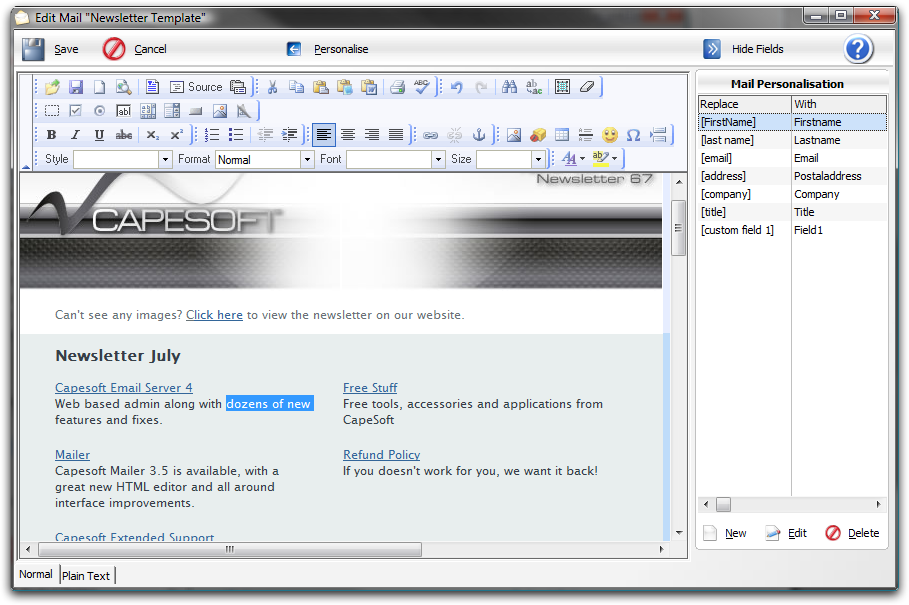
- Double clicking on a Personalisation from the list now inserts
it into the message being edited. Use the buttons or right click
menu to add, edit or remove entries from the Personalisation list.
- Changed/Improved
- "Demo" mode, which was defaulting to limited functionality, to
be fully functional.
- New permanent Capesoft Software Ltd code signing certificate.
- Important: The automatic update
may report an error with the certificate because the details have
changed. This can safely be ignored.
- Fixed
- Fixed: Licensing to ensure that after the demo expires the
application remains fully accessible (only the send functionality is
disabled).
- Fixed: Installer not installing all the required editor files,
resulting in the HTML editor displaying a "page not found" error.
- Fixed: The Cancel button on the Mailer Editor window not
actually closing the window.
- Fixed: In Windows 7, with UAC enabled an
"unable to open UPG file" error was displayed if the application was
not run as an Administrator. This has been resolved and Windows
Vista/Windows 7 will correctly virtualise the data for the
application. The next release (3.6.0) will add full native Vista and
Windows 7 compatibility.
- Fixed compatibility issue in OfficeInside (source code users
should ensure that they are using OfficeInside 2.75 or later,
especially if Mailer is being compiled with Clarion 7).
- HTML Footer is now correctly saved and loaded, and editable
using the new HTML editor (compatible with all versions of Windows
and without dependancies on additional components).
Version 3.5.0 (08 July 2009)
- Numerous Interface adjustments and improvements.
- Removed the "Test" button for sending test messages, as this
provided incompleted functionality. To send a test message add a Test
group with one or more test addresses and perform a standard Send to
that group. This allows the full functionality to be tested, including
Personalisation (Mail Merge) to be done.
- Complete replaced registration and activation system. Provides easy
registration options including:
- Drag and drop of a provided XML activation file for fully
automatic activation.
- Automatic retrieval of the the activation code from the online
server when the Company name and Serial Number are entered.
- Simple copy and paste of activation details from the regisration
email.
- New and improved HTML editor provides a fast, robust and feature
rich editor. A few of the features of the new editor:
- Compatible with all version of Windows, including Windows Vista
and Windows Server 2008.
- Requires only Internet Explorer 5.5 or later on the machine,
there are no other dependencies.
- Generates HTML with Internet Explorer 5, 6, 7 and Gecko browser
(Mozilla / Firefox / Netscape) compatibility.
- XHTML 1.0 support (generates clean, standard compliant XHTML
code).
- Font formatting: type, size, color, style, bold, italic, etc.
- Text formatting: alignment, indentation, bullets list, etc.
- CSS (cascading style sheets) support for a better integration
with web sites, and cleaner, faster, small code with better
consistency.
- What You See Really Is What You Get. Pages are rendered by IE as
you edit them, so the rendering is very accurate.
- Cut, Paste and Past as Plain Text, Undo and Redo.
- Paste from MS Word cleanup with auto detection.
- Link creation.
- Anchors support.
- Image insertion.
- Table creation and editing (add, delete rows, etc) - one of the
best systems in the market.
- Table cells editing (size, colours, etc).
- Form fields.
- Right click context menus support.
- Complete toolbar customisation.
- Easy menu customization and skins (add your own styles,
font-formats, etc ...).
- Skins support.
- Plug-in support.
- Spell checker integration via SpellerPages (additional built-in
spell checking options coming soon!).
- Multi-language support, including Right to Left scripting.
- Complete page editing, including visually setting the overall
page properties.
- Lightweight and fast.
- Automatic browser detection and support for IE 5.5 and upwards.
- Much, much more!
- Internal cleanup and optimsation to allow more rapid development of
future versions.
- Removed all demo limitations. The Demo is now fully functional for
30 days.
- Removed all restrictions on the expired version, except for
preventing sending of mail until the application is activated.
- Fixed "blurred" fonts in entries when ClearType is enabled.
- Closing the Mail Edit window using the window Close control now
prompts before closing.
- Fixed focus issues (the mail window opening behind the main window)
and slow mail opening.
- Fixed potential "security file corrupt" errors when upgrading or
activating Mailer.
Version 3.3.0 (18 April 2007)
- The SSL libraries are now shipped with Mailer
- Added an option for StartTLS for connections that don't support SSL
for the entire connection, but need to switch to secure mode using the
StartTLS command.
Version 3.2.0 (13 April 2007)
- Fixed sorting using custom fields for Mailing Groups, when the list
was sorted by custom fields records where the sort field was blank
no longer displayed in the list.
- Added the ability to set the encoding (character set) for sending
emails from the Program Options.
- Added support for SSL (secure) connections for SMTP and POP.
- Updated all component used by Mailer
- Added support for custom HELO fields, which
resolves problems with mail servers that reject connections when the
HELO is set to the domain part of the email address.
- All lists and browses now save and restore the column widths.
- All browses and lists have a little more space
between lines to make things more legible.
Version 3.1.0 (December 2006)
- Fixed problem with CHM file not launching when Help was clicked on.
(fixed and released as 3.03 before adding additional features to 3.1.0)
- Added ability to set the Helo field for sending mail. This is very useful for
sending to servers that do a reverse DNS lookup if the HELO contains
a domain name.
Version 3.0.3 (13 January 2006)
- Fixed custom fields in the Mailing Groups list not displaying correctly
- Fix Mailing Groups list not correctly saving and restoring format
- Add option to Program Options under Mailing Groups that
allows the Mailing Group list format to be reset where upgrading from
previous versions has resulted in a format where columns are not all
correctly displayed or custom fields have the wrong heading etc.
- Add checking for Personalisations to ensure that a field
is selected from the dropdown (a blank field can result in the program
hanging on send).
- Fixed the error list on the Send window (the list would
not scroll horizontally).
Version 3.01 and 3.0.2 (12 December 2005)
- Fixed copying of Mail messages, the HTML portion was not being copied.
- New certificate used for signing updates.
Version 3.01 (9 December 2005)
- Updated all components, added new functionality:
- NetTalk
- Office Inside
- File Manager
- SendTo
- xFiles
- WinEvent
- HyperActive
- MessageBox
- Draw
- SafeUpdate
- Secwin
- GPF Reporter
- FileExplorer
- Progress
- Speed increases throughout - file imports that were
taking well over two hours now take 14 seconds, editing records in
very large groups that took 3 seconds to being an edit and 3 second
to commit it, are now instant etc.
- Added version resource to file
- Added and updated Tool Tips on all controls
- All new interface, every window in the application has been completely revamped
- File import now shows the number of records in the file,
the number imported, whether duplicates were ignored and the source and destination.
- Updated documentation, added screenshots for all features,
new look and feel for all docs, added and expanded documentation,
- Added the ability to set a specific send speed as well
as selecting the send speed from the dropdown.
- Send Speed now applies immediately without rebooting the application
- Added option to turn on debug logging until app restarts in the Options
- Fixed issues with Configuration wizard when run with
existing mailboxes, redid wizard interface.
- Added SafeUpdate, enabling automatic checking for new
versions of the application and downloading if so desired. New version
are cryptographically signed to ensure that updating is safe and secure
and comes from the correct source etc.
- Added new activation system, activation/registration
can now be done automatically simply by entering the company name,
no email or manual entry etc. is needed. Activation uses Port 80 (HTTP)
and so works through firewalls, proxy server etc.
- When sending is complete if send is successful the message
text displays in green, red text is only displayed for failures.
- Fixed Delete All not working in Mailing Groups (delete
all prompts and when confirmed is instant and permanent).
- AutoUpdate domain does not run if there are no entries in the mailing list
- New Mail Personalisation that supports all fields for
personalisation. Old version is automatically upgraded without loosing settings.
- New filtering system with a single dropdown that is
also significantly faster than the old version.
- Sped up all maintenance tasks such as updating domains etc.
- Added sort headers to the Mailing Groups (in addition
to the QuickSort bar at the top of the Mailing Group window, clicking
on the title of any column in the list will sort by that column, clicking
again will reverse the sort order).
- Fixed Record Not Available error being displayed on application start
- Fixed Log Files Too Large warning being displayed behind splash screen
- Added option for all files that are too large to delete
old records (the prompt gives the option to simply delete old records automatically).
- Added SendTo option that allows mailing lists to be
sent to Excel, Word, PDF, HTML, CSV, Email and Printer (XML and Clipboard coming soon).
- Added new fields to the mailing group (Title, Position, Department etc.)
- All listboxes throughout the program use "greenbar" style for increased legibility.
- Improved resizing of all windows.
- Sped up all bulk processing functions.
- On the Mailing Groups window etc. the listbox "remembers" the
user's settings, so resizing columns etc. is persistent every when
the application is restarted.
- Fixed sending of very large mails.
- Removed limitation for both text and HTML mail stored,
the HTML portion can now be up to 2GB in size!
- Improved HTML to text conversion (even better conversion coming soon)
- Improved documentation for Intellitag and added tooltips
to help explain this very useful feature.
- Added a Mail Personalisation section to the Edit Mail
window, the personalisation section can be show or hidden, personalistions
can be added, and simply pressing the insert button will insert the
Personalisation into the current format (HTML, HTML source or text).
- HTML importing no longer has a file size limitation and the import speed is improved.
- Sending a test mail now supports using Personalisations automatically.
- Optimised Intellitagging (much faster)
- Changed default encoding for HTML, better support for extended ASCII characters.
- Fixed potential problem with sending embedded images.
- Removed incorrect and changed sections of the docs.
- Fixed focus on the main window moving off the Mail Folders list when a Mail Message is selected.
- More "internal" fixes and tweaks than can be listed here...
|
 |





 Main
Software Page
Main
Software Page